Buying an Auto Instrument Panel is not simply a matter of choosing a bright screen or attractive trim. It is a safety, usability, and long-term ownership decision. The right panel should remain readable under direct sunlight, respond quickly with gloved fingers, and resist vibration, heat, dust, and daily cleaning. Small details matter.
Dr. Bryan Reimer, a respected automotive human-factors researcher, has emphasized, “A dashboard is not decoration; it is a driver’s working environment.” That perspective should guide every purchase. Buyers need to examine display brightness, viewing angles, warning-symbol clarity, control placement, software compatibility, sensor integration, installation space, material quality, warranty coverage, and supplier support. These ten areas reveal whether a panel is genuinely practical or merely impressive in a product photograph.
Look closely at the unfinished parts. Are the seams uneven? Does the display reflect your face at noon? Can essential warnings be understood in one second? A panel may look modern but still distract the driver. I have seen product descriptions promise “premium performance” without specifying operating temperatures or update support. That is a warning sign.
Reliable purchasing also requires checking certifications, technical documentation, replacement procedures, and compatibility with the vehicle’s electrical architecture. Ask for real test data, not vague claims. Compare total ownership costs, including calibration, software updates, and future repairs. The cheapest Auto Instrument Panel may become the most expensive choice after installation problems appear. Use these ten tips as a practical inspection guide, while remembering that no checklist replaces professional evaluation.
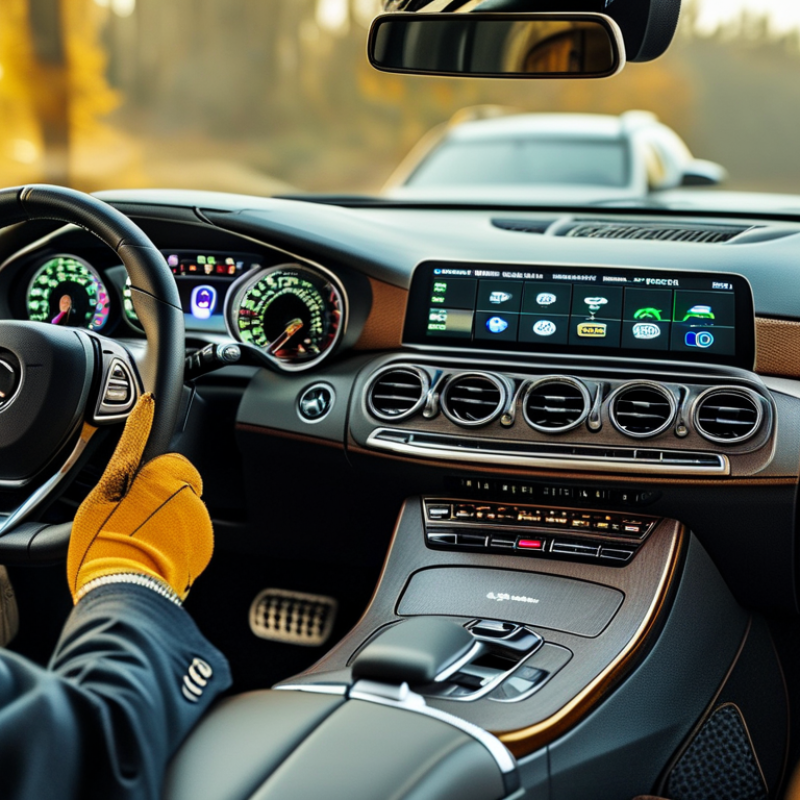
An auto instrument panel is more than a dashboard display. It presents speed, engine temperature, fuel level, warning lights, and sometimes navigation data. Its role must match the vehicle’s electrical and communication systems. A panel designed for basic readings may not support advanced driver information.
Check compatibility before comparing appearance or price. Record the vehicle’s production year, model configuration, engine type, and original panel functions. Then inspect the connector shape, mounting dimensions, operating voltage, and communication protocol. Many modern vehicles use digital networks to exchange data with sensors and control units. An incompatible panel may light up but show incorrect readings.
Small details matter.
A qualified technician should verify wiring diagrams and calibration requirements. The panel must read warning signals accurately, especially for braking, temperature, and oil pressure. Ask for installation instructions, test procedures, and clear technical specifications from the seller. Photos can help, but they cannot confirm electrical compatibility. I have seen buyers focus on screen size and overlook connector differences. That mistake can create extra fitting work and unreliable information. Even a careful checklist is imperfect, so confirm each detail against the vehicle’s service documentation before purchasing.
| Tip | Purchase Check | Vehicle Compatibility Dimension | Practical Data or Standard | Recommended Verification |
|---|---|---|---|---|
| 1 | Define the panel’s role | Display-only, warning display, data logger, or complete vehicle information interface | Basic panels may show speed, engine speed, fuel level, coolant temperature, and warning indicators. Advanced units may also display digital messages and diagnostic data. | List every required input, warning lamp, gauge, and communication function before comparing products. |
| 2 | Match the vehicle voltage | Electrical system nominal voltage and operating voltage range | Passenger vehicles commonly use 12 V systems, while many heavy-duty vehicles use 24 V systems. Actual charging voltage is higher than nominal battery voltage. | Confirm the panel’s specified input range, reverse-polarity protection, overvoltage protection, and ground arrangement. |
| 3 | Check communication compatibility | CAN bus, SAE J1939, ISO 11898, LIN, or direct sensor inputs | CAN communication uses a differential two-wire bus. SAE J1939 is widely used in heavy-duty applications and commonly operates at 250 kbit/s or 500 kbit/s, depending on the system. | Compare baud rate, message identifiers, parameter definitions, connector pinout, and required termination resistance. |
| 4 | Verify sensor input types | Resistive, frequency, pulse, analog voltage, or digital sensor signals | Fuel-level and temperature sensors are often resistive. Vehicle speed and engine speed may be supplied as frequency or pulse signals, while pressure sensors may use analog voltage or digital communication. | Confirm sensor resistance curves, voltage limits, pull-up requirements, pulse frequency range, and calibration options. |
| 5 | Confirm physical dimensions | Cutout size, mounting depth, connector clearance, and panel angle | A replacement panel must fit the available dashboard opening and leave sufficient space for wiring, connectors, ventilation, and service access. | Measure width, height, depth, mounting-hole spacing, and dashboard thickness; compare them with the installation drawing. |
| 6 | Evaluate display readability | Screen size, viewing angle, brightness, contrast, and sunlight performance | Outdoor dashboards require adjustable brightness and strong contrast. A wide viewing angle helps the driver read information without facing the panel directly. | Request brightness data in candelas per square metre, viewing-angle specifications, dimming behavior, and images under direct sunlight. |
| 7 | Review environmental protection | Water, dust, vibration, shock, temperature, and humidity resistance | An IP rating defined under IEC 60529 describes protection against solid particles and water. The first digit concerns solids, and the second digit concerns water. | Choose an environmental rating appropriate for the installation location and request vibration, shock, and operating-temperature test information. |
| 8 | Check warning and safety functions | Warning lamps, audible alarms, priority levels, and fault memory | Important warnings may include low oil pressure, high coolant temperature, charging failure, brake faults, and engine or transmission faults. | Verify that warning symbols, alarm thresholds, flashing patterns, mute functions, and fault-history behavior meet the vehicle’s requirements. |
| 9 | Assess calibration and configuration | Units, scaling, sensor calibration, language, odometer settings, and software configuration | Speed, engine speed, distance, temperature, pressure, and fuel readings depend on correct scaling and calibration of the input signal. | Confirm whether settings can be changed through buttons, a service tool, or configuration software, and identify any data-retention limits. |
| 10 | Review installation and support requirements | Connector compatibility, wiring effort, documentation, warranty, and replacement procedure | A panel can be electrically suitable but still require a new harness, signal converter, programming procedure, or separate interface module. | Request wiring diagrams, connector pinouts, installation instructions, firmware details, warranty terms, and technical support availability. |
: It can show speed, engine temperature, fuel level, warning lights, and navigation information.
Record the vehicle’s year, model configuration, engine type, and original panel functions. Then compare connectors, mounting size, voltage, and communication protocol.
Not always. It may display incorrect readings if its communication system is incompatible.
Check braking, temperature, and oil-pressure warnings carefully. Incorrect signals can create serious maintenance confusion.
No. Confirm compatibility first, then compare appearance, functions, and total cost.
Include the panel, shipping, installation, programming, and possible calibration. Keep a small reserve for fitting problems.
Check operating history, consistent contact details, customer references, test records, and warranty terms. Vague technical answers deserve caution.
Request close images of connectors, mounting points, and the rear housing. Also check display clarity, warning indicators, illumination, and vibration resistance.
No. Photos help, but they cannot verify wiring or electrical communication.
A qualified technician should review wiring diagrams and calibration requirements. Ask for installation instructions, testing steps, and complete technical specifications.
Yes, sometimes. My checklist can miss small details, so verify everything against service documentation.
Keep quotations, test results, warranty terms, installation details, and agreed delivery information.
Choosing the right Auto Instrument Panel requires more than comparing appearance and price. First, confirm its purpose and compatibility with your vehicle’s model, electrical system, dashboard space, and communication interface. Consider whether you need an analog, digital, or hybrid display, and evaluate screen size, brightness, viewing angles, and readability in both daylight and low-light conditions. The panel should clearly present essential driving information, such as speed, fuel level, engine temperature, warning indicators, and other relevant data.
Before purchasing, check sensor support, connectivity options, software functions, update requirements, and installation complexity. Review the materials, construction quality, safety compliance, warranty coverage, and expected service life to reduce future maintenance concerns. Finally, establish a realistic budget that includes installation and possible accessories. Compare suppliers by examining product documentation, customer support, return policies, and professional reputation. A careful evaluation will help you select a reliable, practical, and safe Auto Instrument Panel that suits both your vehicle and driving needs.

 Dongou